Alpha · macOS · for controller DJs
Built for the controller. No compromises.
HotQue7 is a professional DJ app for the Mac, made for mixing on a controller. It follows the whole job — from the library to the post after the gig — and doesn't trade one part of it for another.
36 features work today, 56 more are planned for launch — every one of them is in the crate below.
The Perform screen · alpha build
Everything the mix needs. Nothing it doesn't.
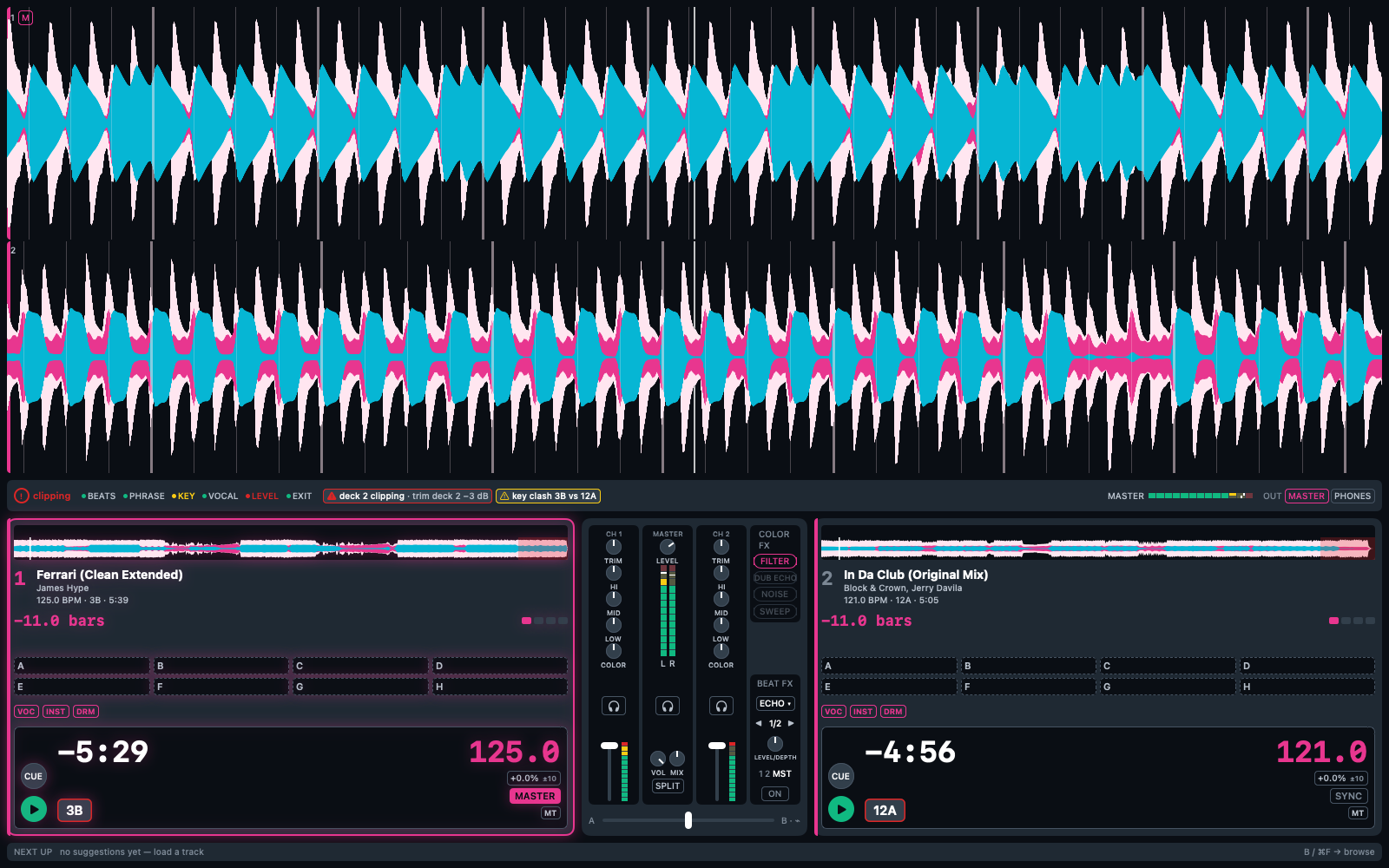
Screenshot from the current alpha build, two real tracks loaded. Tap a number.
What changes in the booth
Counting phrases in your head.
Counted for you — front and center.
Watching meters and hoping.
Told what's wrong — with the fix attached.
No controller, no practice.
Laptop and headphones — a full rig.
Your prep, locked in someone else's database.
An open file on your Mac. Yours.
Several of these you won't find in any other DJ software. That's the point.
01 · Organize · the library
Your library in order — without losing your evenings to it.
Bring what you have, find anything in a keystroke, and let the app do the listening: every track is analysed on your Mac the moment it arrives.
Rekordbox import with playlists, cues and tags, instant search, a waveform in every row — and beatgrid, key, phrases and vocals analysed on your Mac, in the background.
Smart playlists, duplicate detection by audio fingerprint, clean-up for messy metadata, imports from Serato, Traktor, Engine DJ and more — and export back to Rekordbox and Serato, so you're never locked in.
 125.03B5:39
 121.012A5:05
02 · Prepare · the gig
Walk in knowing your set works.
Cues, stems and the plan for the night — done at home, there the second you plug in.
Hot cues set on the pads or carried over from Rekordbox, stems separated once and cached for the tracks you pick, and prep that moves to another version of a track — landing on the same beat.
Gigs with warm-up, peak and closing slots, a set planner with its energy, key and BPM curve, “what fits next?” suggestions, auto-cues you confirm, and a readiness check before you leave the house.
03 · Practice · anywhere
Rehearse anywhere. Hear what you'd do differently.
No controller in the bag? Your laptop and headphones are a full practice rig — and the same Mix Monitor that watches your gigs tells you what went wrong while you train.
A full practice mode with just the laptop, keyboard and headphones — split cue included — and every shortcut on screen while you hold ⌥⌘.
Transition tests on two linked preview players, a Set Score and a debrief after every session, and every function on a shortcut.
The practice rig
Plug in nothing. Practice anyway.
No controller, no audio interface, nothing to plug in: the internal mixer takes over, and split cue puts the mix in one ear and the next track in the other — on any pair of headphones. Train on the train, mix in the hotel room, keep your transitions sharp between gigs.
Illustration, drawn in your browser — what each ear gets with split cue on plain headphones.
Transition tests
Two linked preview players: try a blend between two tracks before it ever reaches a set.
For launchRecord & debrief
A Set Score for every transition and a debrief after the session — so the next one gets better.
For launchShortcuts on demand
Hold ⌥⌘ and every shortcut appears where it applies; let go and the screen is clean.
Works on this page too. Today04 · Play · the set
Eyes on the crowd, not on the screen.
Plug in the controller and play. The screen counts the phrases, the stems sit on your pads, and a second pair of ears watches the mix.
Pioneer DDJ-FLX4 plug and play, live stems on the pads, a phrase countdown front and center, a Mix Monitor that names what's going wrong and fixes it with one press, Beat FX, keylock and sync.
The DDJ-FLX10 with its jog displays, more controllers and MIDI Learn, sampler and sequencer, slip and key shift, and crash recovery that brings your decks back.
Mix Monitor
A second pair of ears that never talks over you.
Every DJ app draws meters and hopes you look at them. HotQue7 evaluates the running mix — level, beats, phrase, key, vocals, and whether the playing track still has an exit — and names what it finds as facts, with the fix attached. One transition, in four moments.
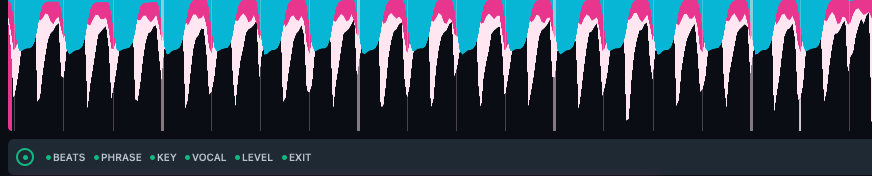
Green is silent.
Beats aligned, phrases lined up, levels clean. Six quiet dots — and nothing else. A warning you have to read instead of notice would be a bug.
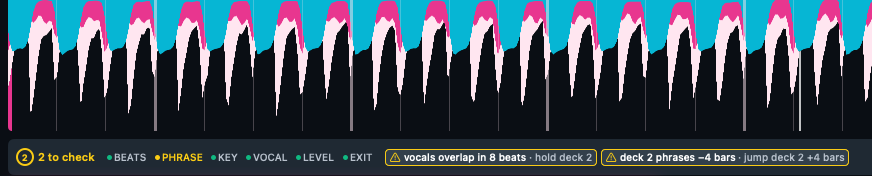
Four bars early. Two vocals about to collide.
Facts, not verdicts — and every finding carries its fix. One press jumps deck 2 into phrase; holding it back keeps the vocals apart.
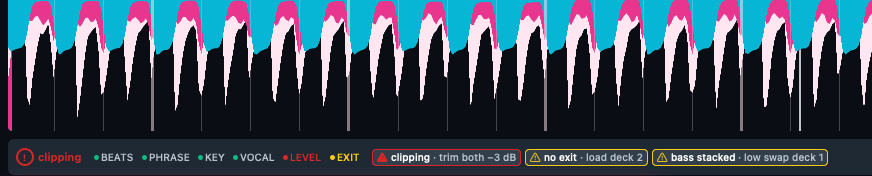
Named before the floor hears it.
Clipping on the master, the outgoing track running out with nothing cued, two low ends fighting. Red leads, amber follows — ranked, so you know what first.
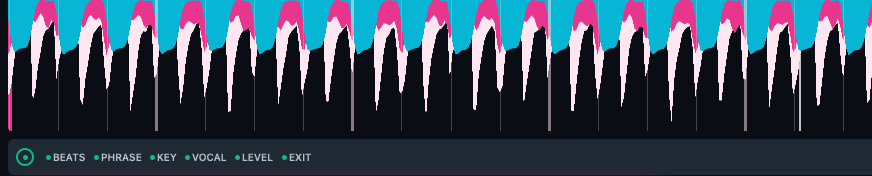
Silent again.
Trim down, next track cued, low swap — the Monitor goes quiet the moment the mix is right. At launch, every finished transition also gets its score, and every set a debrief.
Perform screen, alpha build, on two real tracks — the findings are the Mix Monitor's own test states, pinned for the screenshot. Tap one to see it full size.
Know where you are
The next phrase, counted down.
A neural model finds the real downbeats, phrase analysis finds the structure, and the Perform screen turns both into one big number: bars until the next phrase change. The thing you normally count in your head, readable from across the booth.
- Downbeats, not just beats — bar one is bar one, so phrases line up.
- Key and vocal regions — harmonic matching, and a warning before two vocals collide.
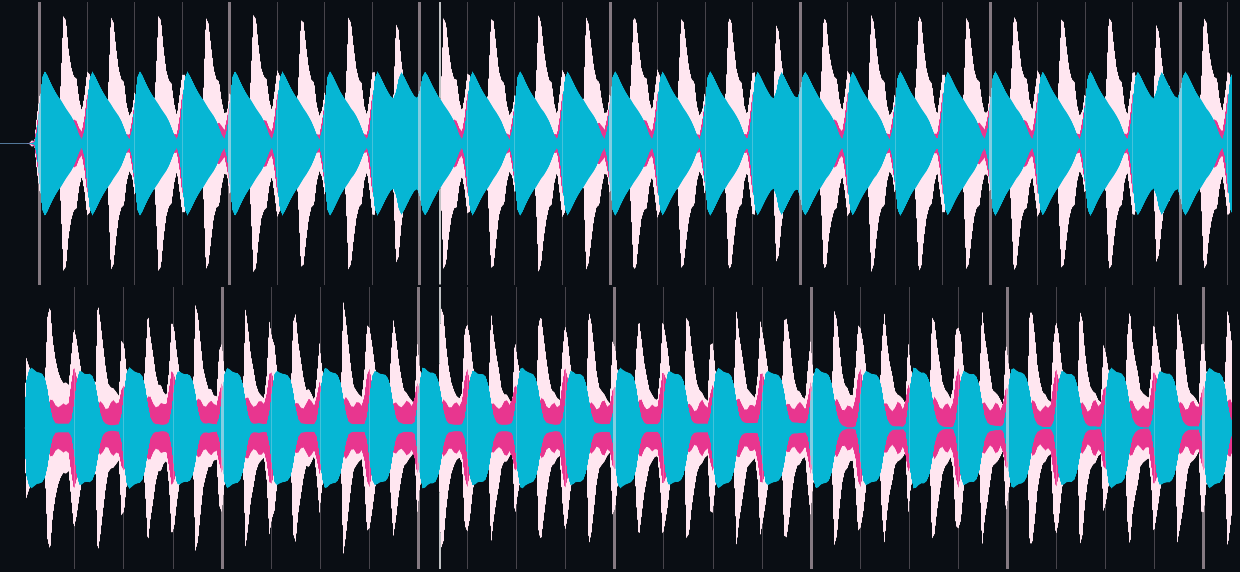
Live demo at 124 BPM — bars.beats into the phrase change and out again, four blocks for the beats of the bar · waveforms: cyan bass · pink mids · blush highs
Stems
Pull a track apart. Live.
Vocals, instruments, drums — one press away on screen or on the controller's pads. Kill the vocal for a clean blend, ride an instant acapella, bring the next track in drums-first.
- Click-free — a mute ramps in ten milliseconds, never pops.
- Untouched when all on — with every stem playing, it's the original, bit for bit.
- Separated once, cached — prepared at home, simply there at the gig.
- On the pads — a STEMS pad mode with lamps that show what's playing.
Illustration, drawn in your browser — three stems and the sum you hear. In the app it's the VOC · INST · DRM row on every deck.
The controller
Plug it in. It just plays.
Plug in a Pioneer DDJ-FLX4: mixer, EQ, filter, Beat FX, hot cues and stems answer to the hardware — and every lamp answers back.
- A set without the trackpad — browse, load, cue and mix from the surface.
- A screen that adapts — it shows what your controller doesn't have.
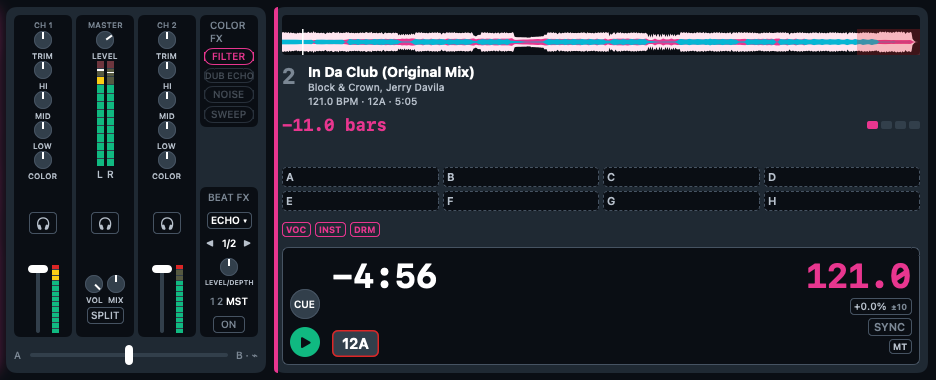
Software mixer and deck column — mirrored on the controller, lamp for lamp.
+ · Under the hood
Made for the booth, down to the pixel.
What runs through every chapter: how it reads, how it runs, and who owns your data.
Native for Apple Silicon, an audio engine that never waits for the screen, offline with no account, and your library in an open format from day one.
100,000 tracks without a stutter, graceful recovery when your Mac runs hot, a free trial with every feature, and a subscription with an exit plan.
Open format
Your library is a file. Open it.
Tracks, cues, grids and analysis live in a plain, unencrypted SQLite database on your disk, with a documented schema. Any tool that reads SQLite reads your library — no export button, no account, no permission needed.
$ sqlite3 ~/Music/HotQue7/library.dbsqlite> .tablesanalysis_result    import_ref         set_plan_entry     track_fts_docsize
audio_file         pin                tag                track_fts_idx
beat_grid          playlist           tag_category       track_tag
cue_point          playlist_entry     track              version_group
gig                saved_loop         track_fts
history_entry      schema_info        track_fts_config
history_session    set_plan           track_fts_datasqlite> select title, artist from track;In Da Club (Original Mix)|Block & Crown, Jerry Davila
Ferrari (Clean Extended)|James Hype
Real output — the current schema, on a library holding the two reference tracks.
Built to be read from the booth
Big numbers, calm colors, dark for the club. It speaks up only when something is wrong.
Same colors, everywhere
Cyan bass, pink mids, blush highs on every waveform — and controller lamps that mirror the screen.
A real Mac app
Written for Apple Silicon. The audio engine never waits for the screen, and it all works offline.
A database, not a black box
Documented schema, unencrypted, on your disk. Open it yourself, any time.
Full export, always
Everything you put in comes back out — to open formats and to Rekordbox or Serato. Leaving is a feature, not a support ticket.
Stop paying, keep your work
If your subscription ends, the app keeps opening your library read-only, with export. Your prep doesn't evaporate because a card expired.
The whole list
Every feature, in one crate.
What works in the alpha today and what's planned for launch — searchable like your library. Nothing in “Today” is a promise; it's in the build.
- TodayRekordbox import — playlists, cues and tags come alongOrganize
- TodayOpen, unencrypted SQLite libraryOrganize
- TodayInstant full-text searchOrganize
- TodayA waveform in every row — click anywhere to listenOrganize
- TodayLink related tracks: versions, edits, stemsOrganize
- TodayAI agents can help curate and tag — opt-in, never during a setOrganize
- TodayNeural beatgrid with real downbeatsOrganize
- TodayKey detection in CamelotOrganize
- TodayPhrase structure: intro, build, drop, outroOrganize
- TodayVocal regionsOrganize
- TodayThree-band waveforms on a Metal rendererOrganize
- TodayAll on-device, in the background — the app never waitsOrganize
- LaunchSmart playlists with nested AND/OR rulesOrganize
- LaunchYour own tag categories, batch taggingOrganize
- LaunchBulk metadata editing, optional write-back to file tagsOrganize
- LaunchDuplicate and version detection by audio fingerprint, with a merge assistantOrganize
- LaunchMetadata clean-up: spellings, case, store junk, artworkOrganize
- LaunchWatch folders with an inbox for new arrivalsOrganize
- LaunchPrep status per track: new → reviewed → gig-readyOrganize
- LaunchMoved files found again, broken ones reportedOrganize
- LaunchSet history and play countsOrganize
- LaunchEvery playlist a track is in, one click awayOrganize
- LaunchDual browser and a session shortlistOrganize
- LaunchImport from Serato, Traktor, Engine DJ, djay, Apple Music and M3UOrganize
- LaunchExport back to Rekordbox and SeratoOrganize
- LaunchFull export to open formats, any timeOrganize
- LaunchVersioned backups with one-click restore, optional encrypted cloud backupOrganize
- LaunchSync across Macs; audio files via your own cloud or NASOrganize
- LaunchBeatport streaming, purchase import and buy linksOrganize
- LaunchDynamic beatgrids for live drums and drifting tempoOrganize
- LaunchEnergy level per trackOrganize
- LaunchAuto-tagging suggestions: genre, energy, moodOrganize
- LaunchRelated tracks from your own libraryOrganize
- LaunchEvery suggestion shows whyOrganize
- TodayHot cues — set on the pads or carried over from RekordboxPrepare
- TodayStems separated on demand for the tracks you pick, then cachedPrepare
- TodayCopy your prep to another version of a track — cues and grid land on the same beatPrepare
- LaunchGigs with timed slots: warm-up, peak, closingPrepare
- LaunchSet planner with alternatives and a remaining-time footerPrepare
- LaunchEnergy, key and BPM curve of any set or playlistPrepare
- LaunchTrack roles: anchor, bridge, safety net, riskPrepare
- LaunchGig-readiness check before you leave the housePrepare
- LaunchHistory while planning — “played twice at this club”Prepare
- Launch“What fits next?” suggestions and set drafts from gig parametersPrepare
- Launch16 hot cues on pad pages, memory cues, cue templatesPrepare
- LaunchAuto-cue suggestions you confirm or correctPrepare
- LaunchCue import from Serato and TraktorPrepare
- LaunchFast grid correction, also from the controllerPrepare
- TodayPractice mode: just the laptop, keyboard and headphonesPractice
- TodayEvery shortcut on screen while you hold ⌥⌘Practice
- LaunchTransition test with two linked preview playersPractice
- LaunchSet Score and a debrief after every setPractice
- LaunchKeyboard-first: every function on a shortcutPractice
- TodayPioneer DDJ-FLX4, plug and playPlay
- TodayLamps that mirror the software, alwaysPlay
- TodayA full set without touching the trackpadPlay
- TodayA screen that adapts to the controller you plug inPlay
- TodayTwo decks with stacked zoom waveformsPlay
- TodayLive Mix Monitor with one-press fixesPlay
- TodayPhrase countdown, front and centerPlay
- TodayStems: vocals, instruments, drums — click-free, on screen and on the padsPlay
- TodaySoftware mixer: trim, three-band EQ, color FX filter, channel fadersPlay
- TodayBeat-synced Beat FXPlay
- TodayKeylock, beat sync and pitchPlay
- TodayHot cues on the pads, loopsPlay
- TodayHeadphone cue and split cue; master and phones on their own outputsPlay
- TodayBrowse without losing sight of the mixPlay
- Todayone more thing in the buildPlay
- LaunchPioneer DDJ-FLX10, including the jog displaysPlay
- LaunchMore DDJ controllers, and MIDI Learn for everything elsePlay
- LaunchExternal mixer mode for multi-channel interfacesPlay
- LaunchCDJ/XDJ control over HIDPlay
- LaunchSound color FX per channel and pad FXPlay
- LaunchSampler and sequencerPlay
- LaunchSlip, reverse, key sync and key shiftPlay
- LaunchInstant doublesPlay
- LaunchPlaylist palette and related tracks mid-setPlay
- LaunchLayout optionsPlay
- LaunchAutomix for your breaksPlay
- LaunchCrash recovery that brings your decks backPlay
- LaunchSet recording — free, with an automatic tracklistShare
- LaunchTracklist export with timestamps — for YouTube, Mixcloud and SoundCloudShare
- LaunchCheck set for YouTube: every track back to back, no transitions — upload it and see what gets blockedShare
- TodayNative macOS, written for Apple SiliconPlatform
- TodayAudio engine decoupled from the screenPlatform
- TodayWorks offline, no account needed to DJPlatform
- TodayYour data in an open format from day onePlatform
- LaunchThermal self-healing: degrade gracefully, recover without a restartPlatform
- LaunchLow latency, and 100,000 tracks without a stutterPlatform
- LaunchA free trial with every featurePlatform
- LaunchSubscription with an exit plan: read-only and export if you stop payingPlatform
- LaunchFair billing: cancel in the app, no hoopsPlatform
Nothing matches. Try “stems”, “cues” or “Rekordbox”.
Launch list
Be there when it drops.
HotQue7 is in alpha and moving fast. Leave your email and you'll hear from us once — the day it's ready for your booth.
One email when HotQue7 ships — then we delete your address. Nothing else, ever. Privacy